



Back to blog
July 23, 2026
The Hidden Costs of a GRC Platform That Nobody Puts in the Proposal
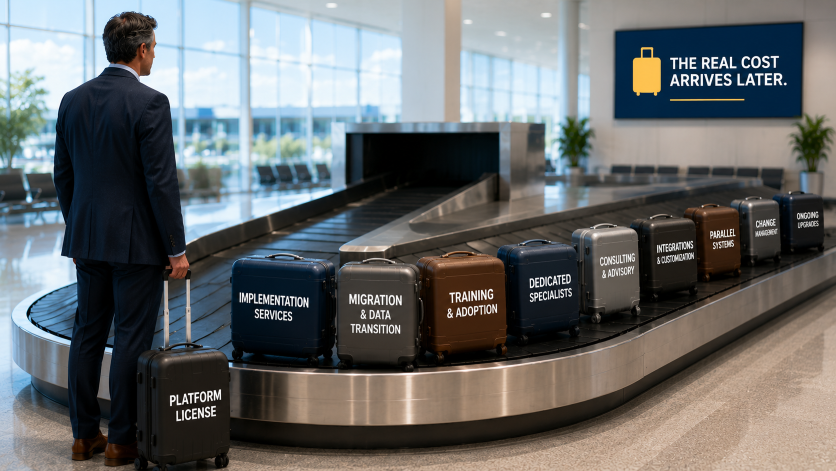
The moment a GRC vendor sends you a proposal, the conversation narrows. You are looking at a number. Maybe it is an annual license fee. Maybe it is a multi-year deal with a discount baked in. Either way, that number becomes the anchor for every conversation that follows.
Your CFO asks what the platform costs. You share the number. It seems manageable. Leadership approves the budget.
Then the real costs start showing up.
This is one of the most consistent patterns in enterprise GRC purchases. The license fee is visible. Everything else tends to arrive later, in the form of invoices, headcount requests, and project delays that nobody budgeted for. By the time the full picture becomes clear, the contract is already signed.
This is not an accident. Vendors are not required to walk you through total cost of ownership in a proposal. They show you what makes the deal look attractive. What you do with the rest is up to you.
So here is what the rest actually looks like.
The Implementation Cost That Nobody Warns You About
In legacy GRC platforms, implementation is where the real money goes.
Consulting fees for enterprise GRC implementations regularly run between $200,000 and $500,000. In some cases, significantly more. These are not optional costs for edge cases. They are the standard expectation for platforms that require deep configuration, custom integrations, and specialized knowledge just to get the system to a working state.
Beyond the dollar figure, there is the time cost. Twelve to eighteen months before you see a working system is standard in legacy platforms. That means twelve to eighteen months of paying both the new platform license and the cost of whatever you were using before. It also means twelve to eighteen months of your team's time spent on implementation rather than on running your actual GRC program.
When you evaluate a vendor, ask very specific questions about implementation. Who does the work -- your team, the vendor's team, or a third-party consulting firm? What is included in the license versus billed separately? What does "go live" actually mean in their timeline; is that the system being turned on, or your frameworks mapped, your controls loaded, and your team actively using it for real work?
The answers to those questions will change your cost picture significantly.
The Ongoing Operations Cost That Hides Inside Headcount
Some GRC platforms are built to be operated by specialists. Not your security team in general. Dedicated GRC platform administrators who understand the system deeply enough to keep it running, configure new frameworks, update controls, and troubleshoot issues.
If your platform requires two or three of those people, their salaries are part of your GRC platform cost. Not officially. Not in any proposal. But in reality, yes.
A mid-level GRC specialist typically earns between $90,000 and $130,000 per year depending on location and experience (the employer’s full cost for such employee is much higher, when including taxes and benefits). Two of them adds up quickly. And because they become the only people in the organization who really understand the system, you also carry concentration risk: if one of them leaves, your program is in trouble.
This is one of the sharpest differences between legacy platforms and modern ones. Platforms built for general practitioners, meaning people across the business who are not GRC specialists, do not carry this cost in the same way. When a legal manager or a business unit leader can actually use the system without needing a specialist to help them, the ongoing operating cost drops substantially.
Ask any vendor you are evaluating: how many dedicated specialists do your customers typically need to run this platform day to day? Then call a few of their reference customers and ask the same question independently.
The Migration Cost That Only Appears After You Commit
If you are replacing an existing GRC platform, you have a migration problem. And migration is expensive in ways that are easy to underestimate before you are inside the process.
Data migration is the obvious piece. Moving historical risk assessments, control evidence, policy libraries, and audit records from one system to another is not a one-click operation. It requires mapping, cleaning, validation, and often significant manual effort.
Less obvious is the co-habitation cost. During a transition period, many organizations need to run both systems in parallel. The old one to access historical data and keep ongoing programs running. The new one being configured and tested. That means two license fees, two sets of administrative overhead, and a team that is split between maintaining the old system and building out the new one.
If your vendor does not support a parallel running period, ask why. And ask what their recommended alternative looks like. A forced cutover from day one is a risk that does not appear anywhere in the proposal.
The Training Cost That Gets Forgotten Until It Is Too Late
Training is almost never included in a GRC platform proposal at its true cost. Vendors typically offer some onboarding sessions. Maybe a documentation library. Sometimes a dedicated customer success manager for the first few months.
What is harder to account for is the ongoing training cost as your team turns over, as new departments join the program, and as the platform itself gets updated. Every new user needs to understand how to use the system. Every new framework you add requires your team to understand how to configure and manage it. Every significant product update requires retraining.
This is not a reason to avoid buying a platform. It is a reason to ask vendors, before you sign, what ongoing training looks like, what it costs, and what happens to that support after the initial contract period ends.
The Cost Nobody Calculates: Staying Where You Are
This one is the most important cost in the whole picture, and it almost never appears in any budget conversation.
What does it cost your organization to stay on your current setup for another 12 to 24 months?
Start with the manual effort. How many hours per quarter does your team spend consolidating data from spreadsheets, preparing audit evidence, and generating risk reports that should come from a system automatically? At a fully loaded cost of $60 to $100 per hour for a senior compliance or risk professional, that number adds up faster than most people expect.
Add the audit preparation cost. If your SOC 2 prep takes six weeks of intensive work from two or three people, that is a significant investment of time that a modern platform could reduce substantially.
Add the gap cost. Every governance and risk management function your current setup cannot support is either being handled manually somewhere else, not being handled at all, or being handled by a separate tool you are paying for additionally. AI governance tools, continuous monitoring solutions, enterprise risk management software bought because the compliance tool could not do it. Those are real costs that belong in the comparison.
And add the risk cost. The cost of a regulatory fine, a failed audit, or a breach that could have been caught earlier with better visibility is harder to calculate but is very much real. Your current setup has gaps. Those gaps have consequences.
When you put all of that together and compare it to the total cost of a new platform, including implementation, operations, migration, and training, the math often looks very different than the license fee comparison suggests.
How to Use This in Practice
Before your next vendor conversation, build a simple two-column comparison. On the left, the true cost of your current state: manual effort, tool sprawl, audit prep time, governance gaps, and the realistic probability of what happens when those gaps surface. On the right, the true cost of the new platform: license, implementation, operations, migration, and training over a three-year period.
That comparison is what you bring to the CFO. Not a license quote. The math, done properly, tends to make a compelling case on its own.
If you want a structured framework for building that comparison, Chapter 4 of our eBook "The Enterprise GRC Buyer's Guide: How to Evaluate, Select, and Implement the Right Platform" walks through each cost category in detail, along with a printable requirements worksheet you can use to anchor every vendor conversation. Download it at www.lockthreat.ai/resources/ebooks.
--------------------
Naeem Hussain is the Founder and CEO of LockThreat. With deep experience spanning enterprise technology, cybersecurity, and AI strategy, he previously served as COO at CirrusLabs, Head of Market Research at Capital One, and Head of Technology Services at ING DIRECT. Naeem holds an MBA from the University of Chicago's Booth School of Business, an MS in Telecommunications and Computers from The George Washington University, and an AI Strategy certification from MIT Sloan Executive Education. The combination of serial entrepreneurship, enterprise technology leadership, and hands-on AI strategy experience gives Naeem a builder's perspective on GRC, compliance automation, and AI governance, and what it takes for organizations to operationalize them at scale.
On This Article

Copied!





.png)
.png)